
The latest version of OBS is out, and it seems to be getting longer between releases nowadays (OBS 31 was released in December 2024) but also there was a hotfix almost immediately. So what is new do you ask? Well i will outline the new features below
32.0.1 Hotfix Changes
- Fixed a possible crash in 32.0.0 on Windows when opening source properties [wanhongqing123]
- Fixed an issue in 32.0.0 where browser sources would break after switching scenes [tytan652]
- This issue may also have caused increased resource usage.
- Fixed an issue in 32.0.0 with the audio deduplication logic when an Audio Capture Source device is also used for monitoring [pkviet]
- Fixed an issue in 32.0.0 where Multitrack Video settings were unavailable to Custom Services [PatTheMav]
32.0 New Features
- Added a basic plugin manager [FiniteSingularity/PatTheMav/Warchamp7]
- Added opt-in automatic crash log upload for Windows and macOS [PatTheMav/Warchamp7]
- Added Voice Activity Detection (VAD) to NVIDIA RTX Audio Effects, which improves noise suppression for speech, as well as several optimizations to NVIDIA Effects [pkviet]
- Added chair removal option for NVIDIA RTX Background Removal, allowing removal of chairs [pkviet]
- Added experimental Metal renderer for Apple Silicon Macs [PatTheMav]
- Added Hybrid MOV support [derrod]
- Brings ProRes support on macOS and a more widely supported HEVC/H.264 + PCM audio option to all platforms
32.0 Changes
- OBS Studio will no longer load plugins built for a newer release of OBS to prevent future compatibility issues [norihiro]
- Added custom OBS widgets in preparation for larger UI updates [derrod/gxalpha/Warchamp7]
- Added preparations for Metal renderer (stay tuned!) [PatTheMav]
- Changed default bitrate from 2500 to 6000 Kbps [notr1ch]
- Changed the crash sentinel file location to its own subdirectory [PatTheMav]
- Improved audio deduplication logic to cover more cases of nested scenes, groups, and multiple canvases [pkviet]
- Prevent audio duplication when sources are set to “Monitor and Output” while the monitoring device is also being captured [pkviet]
- Updated the default settings for AMD encoders [rhutsAMD]
- Improved accuracy of chapter markers in Hybrid MP4/MOV [derrod]
- Re-hid the cursor in edit fields on macOS [gxalpha]
- Improved format selection for PipeWire video capture [tytan652]
- Removed workarounds to prevent loading Qt 5 based plugins [RytoEX]
- Removed the –disable-shutdown-check launch flag [PatTheMav]
- Hybrid MP4/MOV is now out of beta and has been made the default output format for new profiles [derrod]
32.0 Bug Fixes
- Potentially fixed a rare crash on macOS when moving or resizing the OBS window [PatTheMav]
- Fixed a crash with SRT when using an invalid URL [pkviet]
- Fixed a crash when setting non-default pkt_size with SRT [pkviet]
- Fixed a crash in Media Source when playback starts with certain video files [howellrl]
- Fixed a UI deadlock when opening source properties from the Sources list when the Windows setting ‘Snap mouse to default button in dialog boxes’ was enabled by adding a 200ms delay before creating the properties window [Warchamp7]
- Fixed a memory leak when trying to output Hybrid MP4 to a non-writeable location [norihiro]
- Fixed rare occurrence of multiview becoming blank [norihiro]
- Fixed SRT reconnection failures [pkviet]
- Fixed overflow texture rendering sRGB-awareness [PatTheMav]
- Fixed incorrect color range property setting for AMD AV1 encoder [rhutsAMD]
- Fixed Hybrid MP4 file splitting not working correctly in some cases [derrod]
- Fixed not being able to capture higher than 60fps with macOS Screen Capture [jcm93]
- Fixed focus not displaying properly in hotkey settings on macOS [gxalpha]
- Fixed the scrollbar appearing invisible in Light and Rachni themes [shiina424]
- Fixed HEVC frame priority not being set correctly in some cases, potentially causing playback errors when dropping frames [dsaedtler]
- Fixed an issue that could result in increases to output latency after temporary encoder stalls [dsaedtler]
- Fixed an issue where Multitrack Video could still be enabled after switching from a service that supports it to one that does not [Penwy]
- Fixed an issue where GetGroupList with obs-websocket would return nothing [gxalpha]
- Removed a workaround for older Qt versions that prevented docks from loading correctly while OBS is maximized [RytoEX]
As you can see that is a long list, but for me the biggest thing is the Plugin Manager, something that is long, long overdue. OBS relies on plugins for many functions that are taken for granted, and the instability and other issues caused by running plugins was hard to track down. With the plugin manager disabling a plugin is very simple, and whilst I personally have not seen it happen yet, updating plugins should be way, way easier!
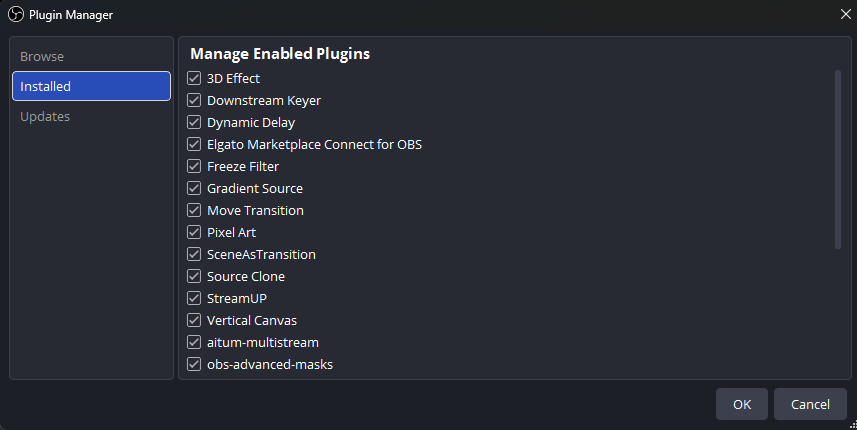
As you can see the plugin manager is simple but so far appears to work well, albeit in a basic form. Hopefully it can be fleshed out in future updates like 32.1. I mean currently the Browse and Updates are greyed out for me and do nowt but it is a start at least. To be honest the rest of the changes are minor but hey at least we are getting there with the plugin manager being something I think is at least 5 years behind the times at least.
So how does it work, well it is pretty much exactly the same as it has been for years now. I think the big issue around streaming now is that the platforms have stopped innovating. Twitch is pretty much static, for various reasons, but having a cap for most people at 1080p is pretty pathetic in 2025, and youtube does good quality at 4K but still hasn’t got support for SRT streaming despite being promised over 2 years ago. This artificially lowers the quality and for me is one of the reasons that many people have stopped watching or doing as many livestreams as they used to. I mean things like music livestreams or events livestreams in that, there are plenty of gamers doing livestreams still but even that amount is dropping. I think this platform lack of ambition is why many have gone back to just uploading videos to youtube for example, and also the fact that monetising a livestream is pretty much impossible still. But hey, I digress – this isn’t the fault of OBS so much just how the landscape is out there…
So is it worth upgrading/updating then? Well for me it is a yes simply for the plugin manager. Finding a plugin that for example is causing crashes is much easier now than before, and once the browse and upgrade parts come on stream then this will make OBS a much friendlier program for everyone. For me personally 32.0.1 is the most stable my setup has been for a while now with no crashes so far (1 with 32.0.0) and now I have an RTX card I can use decent background removal on my webcam which personally I find very useful. OBS just about keeps its nose ahead from the other pretenders but the streaming landscape is moving to more paid for features again or free platforms that are restrictive in some ways. This is how the landscape is going though and I can see totally free services pretty much disappearing in the future because they will become so limited…
OBS 32
Quite a small update in terms of features but the plugin manager was urgently needed! I would say it is worth upgrading…
Pros
The best streaming solution
Good price
Does everything with plugins you need
Cons
Plugins needed for some basic tasks
Can still be hard to grasp with a multitude of options
No crashes yet but past history tells me it might not be 100% stable